
New Blog Series: SimpliCITY – Simply Cyril’s IT DIY
How to set up simple, safe and beautiful data backup solutions for home and small enterprise users?
How to make sure your personal data stays private?
How to numerically analyse your skills and potential?
How to price & select the right pricing schemes for your health care insurance?
These and further questions will be posted in my new blog post series SimplyCITY, which is short for Simply Cyril’s IT DIY. Have fun!
Introduction
This first article will cover my home setup for backing up data from our household. My data backup follows a simple principle: 3-2-1.
Why even back up your data?
You may ask: “Why should I bother backing up my data? I’ve never lost anything yet. Anyways, my data is not that important.”
Two fundamental flaws lie in this statement. The first mistake concerns the word “yet”. Hard disk lifespan depends on many factors, such as the environment (temperature, dust), brand / quality as well as the actual usage. Although some drives may survive for 10+ years, some drives can already fail after only few weeks of usage (source). So it’s not a question of whether, but rather when your data will get lost if you don’t have an appropriate backup solution.
The second flaw lies in thinking that you don’t have anything important. In today’s world, it’s almost impossible to not rely on data to a great extent, be it for tax declarations, saving digital contracts of your home, or keeping photos of your loved ones.
Apart from drive failure, HDD data can also be lost or corrupted due to bitrot, denoting the spontaneous corruption of data on a seemingly working drive, making the corrupted data effectively useless (see box below).
Bitrot
Bitrot refers to the degradation or corruption of data stored on digital media over time due to various factors such as hardware degradation, electromagnetic interference, or software bugs. It can lead to the loss or alteration of data, rendering it unreadable or unusable. To mitigate the impact of bitrot, data integrity measures like checksums, redundant storage, and regular backups are employed to detect and correct errors, ensuring the long-term preservation and reliability of digital information (thanks to ChatGPT for this accurate summary!).
Imagine: It’s your daughters 18th birthday and you want to make a slideshow with pictures of her as a kid but the external hard disk on which you keep all your data is rotten (see bitrot info box above). You will be desperate and your only way of getting the data will be through a costly data rescue expert, who might not even be able to retrieve all of your lost data. This happened to Tony Northrup, a photographer and tech expert who has written over 30 books on IT.
What is the solution to this? Elaborate a data backup solution using the simple 3-2-1 approach.
What is 3-2-1?
Here is a simplified schema of 3-2-1:

What does this mean?
First, you keep 3 copies of all of your data. For data which you use regularly, one copy will be your working files. The other two data copies will be for backup.
Second, have the data copies on at least 2 separate drives. I actually once dropped a hard drive from about 40 cm above the ground and it died. Also, as seen above, hard drives have a limited lifespan of only a few years.
Last, one of the copies should be at a different place, in case your house burns down (I hope that never happens).
Sounds easy, right? So let’s look at how I implemented this at my home.
My personal approach
When I bought my first camera and started shooting, I realised that I’d quickly need a solution for offloading the massive amounts of data produced by my photography projects. I started off by buying a very simple network-attached storage (NAS), which is kind of a hard drive mounted to your local network. There are several benefits of this over a simple external hard drive, however, for me, the main purpose of this was to have a storage solution with ample capacity which I could access from anywhere, anytime. My first NAS was a «WD My Cloud Mirror Gen 2» (short «WD My Cloud» thereafter) with two 3-terabyte HDDs (hard-drive disks), giving me 6 terabytes of HDD storage, of which I could use 3 TB, as I used a so-called RAID-1 setup. This means writing all data on both drives. RAID stands for Redundant Array of Independent Disks and designates various computer science concepts for distributing data across disks, using concepts such as mirroring or striping (more on this can be found on Wikipedia if you’re interested). Fortunately, with an end consumer solution such as the WD My Cloud, you don’t need to worry about the implementation, you just need to select the RAID scheme and the NAS does it all for you.
With the RAID-1 setup on my first NAS, the WD My Cloud, if one hard drive failed, I could buy a new disk and copy the data over from the remaining disk. While this approach fully satisfied KISS (Keep it Simple & Stupid), it did not satisfy all of the 3-2-1 rules:
- Rule «3»: I only had two copies of my data, as I deleted data from my computer once it had been transferred to my NAS.
- Rule «2»: I did have my data on two disks, so this rule was satisfied.
- Rule «1»: I didn’t have a remote backup, so if my apartment went down in flames, I would not have any rescue plan.
With time, my photography ambitions grew and I decided to upgrade to a more professional storage solution. After some research, I decided to get a Synology NAS. A few advantages of the Synology NAS over the old WD My Cloud NAS are:
- More drives allow for more data-efficient RAID setups (more on this below)
- Better thermal management (average temperatures of ca. 30°C rather than 50°C) leading to longer HDD life
- Faster I/O (in/out) speed thanks to better processor, RAM and hardware in general
- VPN using my home network, allowing me for instance to watch Swiss television shows abroad or to browse securely when traveling
- Extremely feature-rich UI and tools, such as Hyper Backup for backing up your NAS to a remote NAS. More on this will be covered in an upcoming article.
- Ability to use Dropbox-like features on local computer, such as support for public, password-protected link sharing or on-demand file access to save local storage
- Support for multiple users with very granular access rights
My current home NAS setup is shown in the picture below:
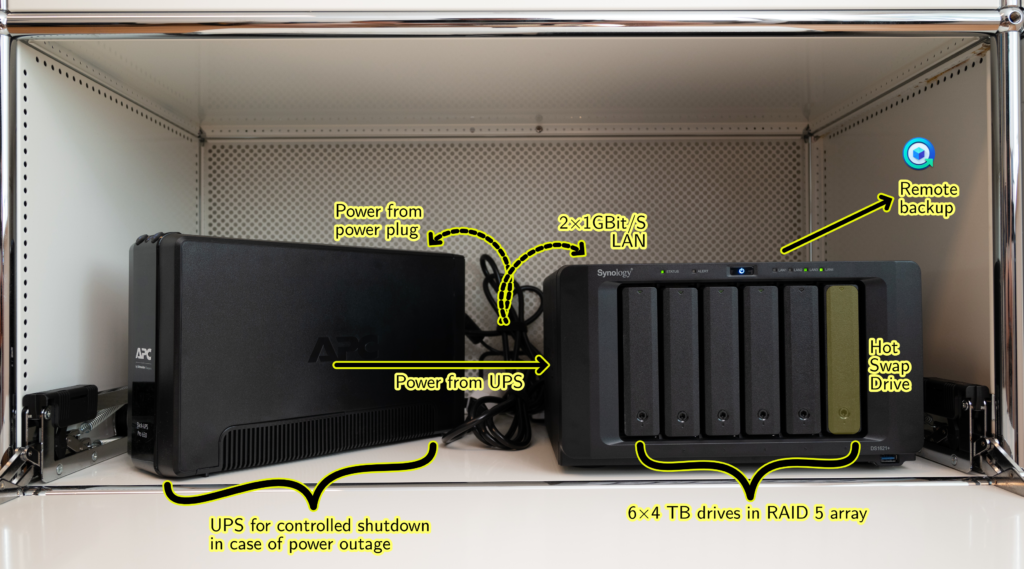
A few details:
- I used an “upstream” UPS (Uninterruptible Power Supply) device to deliver power to the NAS. The UPS has a built-in battery which manages to deliver power to the NAS during roughly 30 minutes in the unlikely case of a power outage to allow the NAS to shut down securely, which is to avoid data loss.
- I use two LAN cables, each delivering up to 1 GBit/s, to increase the transfer speed. I could also use a 10 GBit/s ethernet card but this would make little sense given that the limiting factor for my setup is the read/write speed of HDDs.
- I use a RAID 5 array. This allows to spread out data on N-1 available disks by using only 1 disk for backup thanks to the concept of parity bits. This increases available storage capacity while only slightly impacting read/write speed.
- I keep one drive unused and defined it as a “Hot Swap” drive. In the case of a failure of one of the other disks, the lost data would be restored to the Hot Swap drive using the other remaining available disks.
- I use the “Hyper Backup” tool offered by Synology to backup my data to a remote NAS. In fact, I used my old WD My Cloud NAS for an offsite backup. An upcoming article will show how I set up an offsite backup from Synology to my WD My Cloud.
Please let me know in the comments what you think of my data backup solution and of this new blog format in general. Please also let me know if you have suggestions for upcoming blog posts!
Disclaimer
The purpose of this blog post is to share my personal experience with certain IT projects rather than to give a comprehensive or systematic overview of certain tools. Although I provide some tutorials, I would like my contents to be used in a more inspirational way. I don’t take any responsibility for lost, stolen or corrupted data, or any other form of detrimental outcome resulting from the usage of the contents of this blog. Usage of these contents for malign or criminal intents are most strongly discouraged and no responsibility is assumed by the creator of this blog article for any such actions.